
Latest Version
3.2.8
April 16, 2026
Design
Android
25 MB
51
Free
com.passport.photo.maker.id
Report a Problem
More About Passport photo maker
Passport Photo Maker – Photo ID APK (Latest Version)
Description
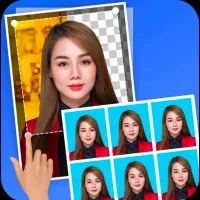
Passport Photo Maker – Photo ID is a convenient and easy-to-use app that allows users to create professional passport-size photos directly from their Android devices. It is designed to help you generate ID photos for passports, visas, driving licenses, and other official documents without visiting a photo studio.
The app supports multiple country formats and standards, ensuring your photos meet official requirements. You can choose the required size, background color, and layout according to your country’s specifications. It also provides tools to crop, adjust brightness, contrast, and align your face properly for accurate results.
With built-in templates and guidelines, Passport Photo Maker ensures that your photos are correctly sized and positioned. You can preview your photo before saving and print it or share it digitally for online applications.
The app is lightweight and user-friendly, making it suitable for anyone who needs quick and professional ID photos at home. It saves both time and money while delivering high-quality results.
Key Features
📸 Passport Photo Creator – Create ID photos instantly
🌍 Multiple Country Formats – Supports global standards
✂️ Auto Crop & Alignment – Perfect face positioning
🎨 Background Editor – Change or remove background
📐 Custom Sizes – Adjust photo dimensions easily
🖨 Print Ready Layouts – Ready for printing
📤 Easy Sharing – Save or share digitally
⚡ Fast Processing – Quick and efficient results
📱 User-Friendly Interface – Simple to use
How to Install
Download the Passport Photo Maker – Photo ID APK file.
Go to Settings > Security on your Android device.
Enable Unknown Sources.
Open the downloaded APK file.
Tap Install and wait for completion.
Launch the app and create your ID photos.
FAQs
1. Can I create passport photos for any country?
Yes, the app supports multiple country formats and sizes.
2. Do I need a professional camera?
No, you can use your phone camera.
3. Can I print the photos directly?
Yes, the app provides print-ready layouts.
Pros / Cons
✅ Pros
Saves time and money
Supports many country formats
Easy to use
Customizable photo settings
Quick results
❌ Cons
Some features may require premium
Ads may be present
Accuracy depends on user input
Conclusion
Passport Photo Maker – Photo ID APK is a practical tool for creating professional ID photos at home. With its easy-to-use features, multiple format support, and quick processing, it is a great solution for anyone needing passport or ID photos. While some advanced features may be locked, the app still offers excellent value for everyday use.